Free Fire UID Check: It is frequently necessary to add a buddy, read their profile, or enter their UID in order to compete in a tournament when playing Free Fire. A lot of players don’t know where to look for their UID. This post will provide an easy-to-understand explanation of how to check your FF UID if you have the same question.
Your unique identification number is your UID. This ID is connected to your profile, rank, and all gaming data in the Free Fire universe, making it even more significant than your name. Therefore, it is essential for every player to know their UID and use it appropriately.
What is an FF UID and why is it so important
Each participant is uniquely identified by their FF UID, also known as User ID. The UID never repeats, but a name might. Your entire game is connected to this eight- or ten-digit number.
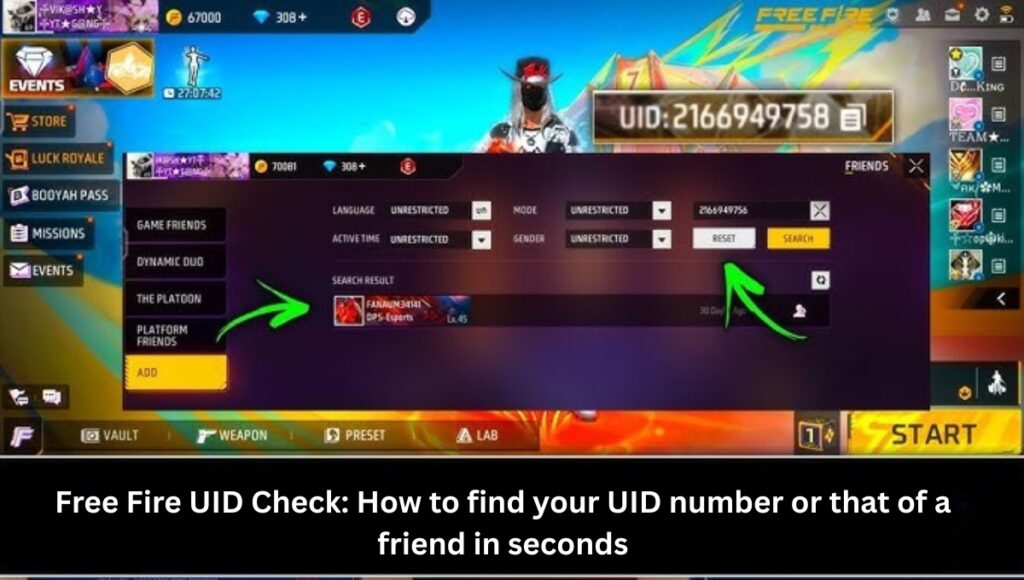
You can add friends, share your profile, and enter a tournament using your UID. Although players frequently alter their names, their UID never changes, making it a permanent identity. Your rank, battle stats, K/D ratio, and level are all readily accessible via your UID.
How to Check Your Free Fire UID Explained in Simple Terms
To verify your UID, you don’t require any third-party websites, tools, or hackers. All you have to do is launch the game and tap your profile. The top bar displays your UID. Free Fire acknowledges this approach as safe and authorized.
The same method can be used to locate your friend’s UID. The UID will show up if you just navigate to your friends list and open the profile of the individual whose ID you want. This approach is thought to be the simplest and safest.
UID finding tools are used by many players, but using them could jeopardize your account. As a result, utilize the game’s official procedures at all times.
Why should you check your Free Fire UID
There are numerous advantages to checking your UID. The UID is the quickest way to add a buddy or see their profile. It can be challenging to determine the true account when searching for a name because it frequently turns up several players with the same name. This issue is immediately resolved by the UID.
Submitting your UID is crucial if you participate in tournaments because it allows you to monitor your performance after the game. Additionally, the UID is crucial for exchanging statistics, making unique rooms, and sending presents online.
Are UID Finder Tools Safe
Many novice players look for UID Finder tools, however it’s crucial to realize that the majority of these programs are dangerous. Numerous websites need login credentials, which increases the possibility of losing your account.
An official, totally secure way to verify your UID has been made available by Free Fire. No external tools are required. Simply take the UID out of the game and use it worry-free.
Overview
| Information | Details |
|---|---|
| Feature Name | FF UID Check |
| Use | To find your own or others’ UID |
| Importance | Helps add friends, view profiles, join tournaments, and check game data |
| UID Length | Unique 8–10 digit number |
| Method | From in-game profile, friend list, or official UID search |
FAQs
Q. Where can I find my Free Fire UID?
Your UID appears right below your in-game name on your profile.
Q. Can a UID be changed?
No. The UID is permanent. Only your in-game name can be changed.
Q. Can an account be hacked through a UID?
No. UID is public information and it cannot be used to hack an account. Still, never share your login details with anyone.
Q. Can I check my friend’s UID?
Yes. Open their profile from your friend list and you can see their UID there.
Disclaimer: This article is based entirely on Free Fire’s official features and safe methods. Do not use any third-party apps, websites or unofficial tools to check UIDs. These can lead to account bans or security risks. Always rely on the official in-game options for checking your UID.
Also Read:
Free Fire Try Now: New update allows you to try premium items for free
Free Fire Winterlands Event 2025: Snowy Skins and Free Rewards
Free Fire Dai Mubai Bundle: Claim the Tiger Warrior Look Free